
Robots.txt and XML Sitemap are two critical technical SEO files that help Google understand how to crawl and index your website. When used correctly, they improve search engine visibility and prevent crawling errors. When used incorrectly, they can completely block your website from Google.
Many websites — including UAE business websites — make serious mistakes with these files without realizing it. This guide explains what robots.txt and XML sitemaps are and how to use them properly in 2025.
🤖 What Is Robots.txt?
Robots.txt is a file that tells search engine bots which pages or sections of your website they are allowed to crawl.
Example:
User-agent: *
Disallow: /wp-admin/
Allow: /wp-admin/admin-ajax.php
Robots.txt is used to:
- Prevent crawling of admin pages
- Block duplicate pages
- Save crawl budget
- Control bot access
⚠️ Important: Robots.txt does NOT block indexing if a page is already known — it only controls crawling.
🗺 What Is an XML Sitemap?
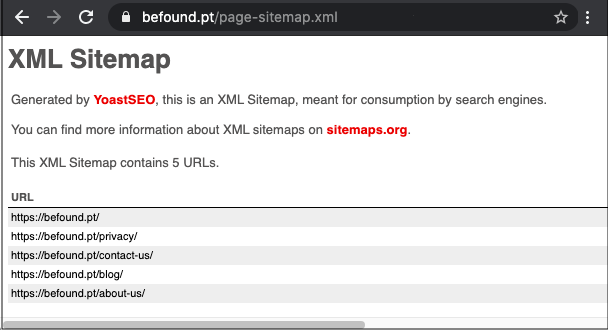
An XML Sitemap is a file that lists all important pages on your website to help search engines discover them faster.
Example sitemap pages:
- Homepage
- Blog posts
- Service pages
- Category pages
Sitemaps help Google:
- Find new pages
- Index content faster
- Understand website structure
⭐ Why Robots.txt & Sitemap Are Important for SEO
✔ Improves crawling efficiency
✔ Helps Google prioritize important pages
✔ Prevents crawling of low-value pages
✔ Reduces crawl errors
✔ Speeds up indexing of new content
For large or frequently updated websites, these files are essential.
🛠 How to Use Robots.txt Correctly (Best Practices)
✅ 1. Do Not Block Important Pages
Avoid blocking:
- Homepage
- Blog pages
- Service pages
- Product pages
Common mistake:
Disallow: /
This blocks the entire website.
✅ 2. Block Admin & Duplicate Pages Only
Recommended pages to block:
- /wp-admin/
- /login/
- /cart/
- /checkout/
- Filter or parameter URLs
✅ 3. Always Test Robots.txt
Use Google Search Console → Robots.txt Tester to check for errors.
✅ 4. Do Not Use Robots.txt to Hide Sensitive Data
Robots.txt is public.
Never use it to protect private information.
🛠 How to Use XML Sitemap Correctly
✅ 1. Include Only Important Pages
Your sitemap should include:
- Indexable pages
- Pages with valuable content
Exclude:
- Thank-you pages
- Admin pages
- Duplicate URLs
✅ 2. Keep Your Sitemap Updated
Whenever you:
- Publish a new blog
- Update a page
- Delete a page
Your sitemap should update automatically.
✅ 3. Submit Sitemap to Google Search Console
Steps:
- Open Google Search Console
- Go to Sitemaps
- Add sitemap URL
- Submit
Example:
https://yourwebsite.com/sitemap.xml
✅ 4. Use One Sitemap or Multiple (If Needed)
- Small websites → 1 sitemap
- Large websites → Multiple sitemaps (blogs, products, pages)
🚫 Common Robots.txt & Sitemap Mistakes
❌ Blocking CSS or JS files
❌ Blocking mobile pages
❌ Submitting broken sitemap URLs
❌ Including noindex pages in sitemap
❌ Forgetting to update sitemap
❌ Blocking entire site accidentally
These mistakes can destroy SEO rankings.
🧪 Tools to Manage Robots.txt & Sitemap
Use:
- Google Search Console
- Yoast SEO (WordPress)
- Rank Math
- Screaming Frog
- Ahrefs
These tools simplify technical SEO.
🏁 Conclusion
Robots.txt and XML sitemaps are small files with a massive SEO impact. When configured correctly, they help Google crawl and index your website efficiently — leading to better rankings and faster visibility.
For UAE businesses competing in a crowded digital space, proper use of robots.txt and sitemaps is essential for technical SEO success.